How to Build ChatGPT Plugin Extensions: Turn ChatGPT Into Your Free Distribution Channel
How to Build ChatGPT Plugin Extensions (And Ride ChatGPT’s Distribution)
How to build ChatGPT plugin extensions is the highest-leverage question a small developer can ask this month. On September 29, 2026, OpenAI turned ChatGPT into an app store: plugin extensions — full applications that live inside ChatGPT — get a dedicated sidebar home, interactive panels, and file viewers, distributed through OpenAI’s directory and recommended inside conversations. OpenAI claimed 1.2 billion weekly ChatGPT users on the opening slide (reported, not independently confirmed). Now the math that matters: if your app normally pays $2–$5 per install in ads, 10,000 users costs you $20k–$50k. Every install ChatGPT’s directory and in-chat suggestions hand you costs roughly $0 in acquisition. One focused tool — a dashboard, an editor, a file viewer — can be your ticket. This guide covers the real path: the live docs, the SDK, the submission flow, and the money traps hiding in OpenAI’s own rules.
 Image: OpenAI
What plugin extensions actually are
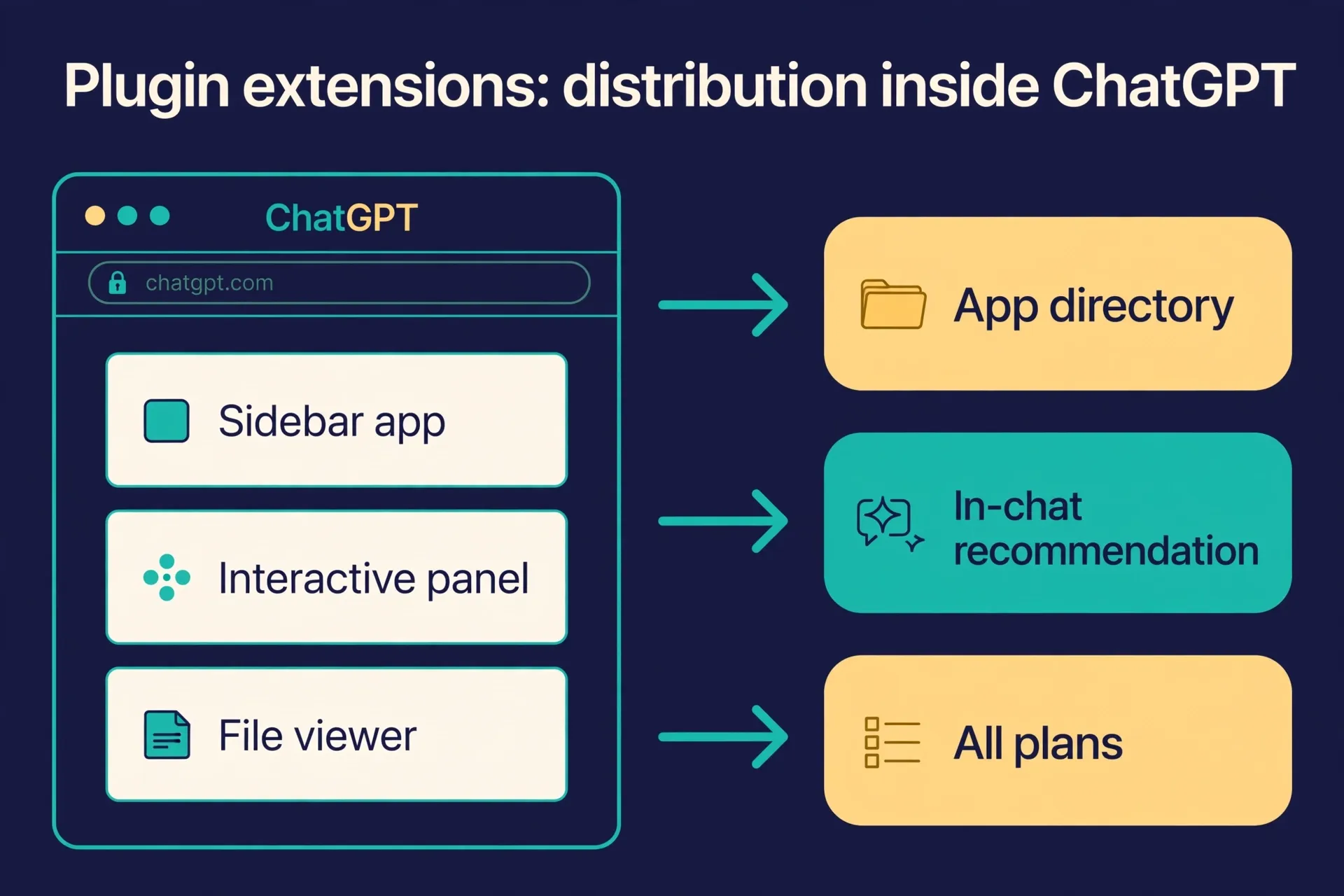
Forget the old plugins. Before DevDay, a ChatGPT plugin was a side feature — a connector that piped data into a chat. Plugin extensions are a different animal: “essentially entire applications that feel native to ChatGPT,” in Sam Altman’s words on stage. That means:
- Sidebar destinations — your app gets its own home in the ChatGPT sidebar, not just a chat thread.
- Interactive panels — users work with your tool while chatting, side by side with the conversation.
- File viewers — render whatever file formats your product uses, right inside ChatGPT.
The stage demos told you exactly who this is for: Canva, Figma, and Shopify (plus a Meetings app and Photoshop functionality, per the keynote recaps). If your product produces visual or file-based work — designs, documents, spreadsheets, dashboards — this is your storefront.
Technically, it’s the same stack OpenAI documents as the Apps SDK: your app is an MCP server exposing tools plus a web component rendered in an iframe inside ChatGPT, using the open MCP Apps UI standard. The live quickstart is at developers.openai.com/apps-sdk/quickstart. Build once, and it runs across MCP Apps-compatible hosts.
How distribution works (and why it’s the whole point)
Two channels, both owned by OpenAI:
- The plugin directory. A universal directory shared by ChatGPT and Codex. Users browse, install, and approve each plugin’s access needs individually.
- In-conversation recommendations. When ChatGPT detects a relevant need mid-chat, it surfaces your plugin right there. This is the part ads can’t buy — intent-matched placement at the exact moment of need.
It’s announced for all plans — the whole ChatGPT user base, not just Pro. One caveat to track honestly: RuntimeWire notes the documentation currently says web extensions for Free and Go users are coming soon, so treat “all plans” as rolling out rather than fully live. (Last verified 2026-09-30.)
Picture the scene: a solo dev — call her Lena — ships a PDF-annotation viewer plugin over four weekends. She has no marketing budget. A thousand users a month type “help me review this PDF” into ChatGPT, and ChatGPT itself suggests Lena’s plugin. Her customer acquisition cost for those users is zero dollars. That’s the play.
The real developer path: from zero to a working app
OpenAI’s docs describe a concrete pipeline. Here it is, step by step:
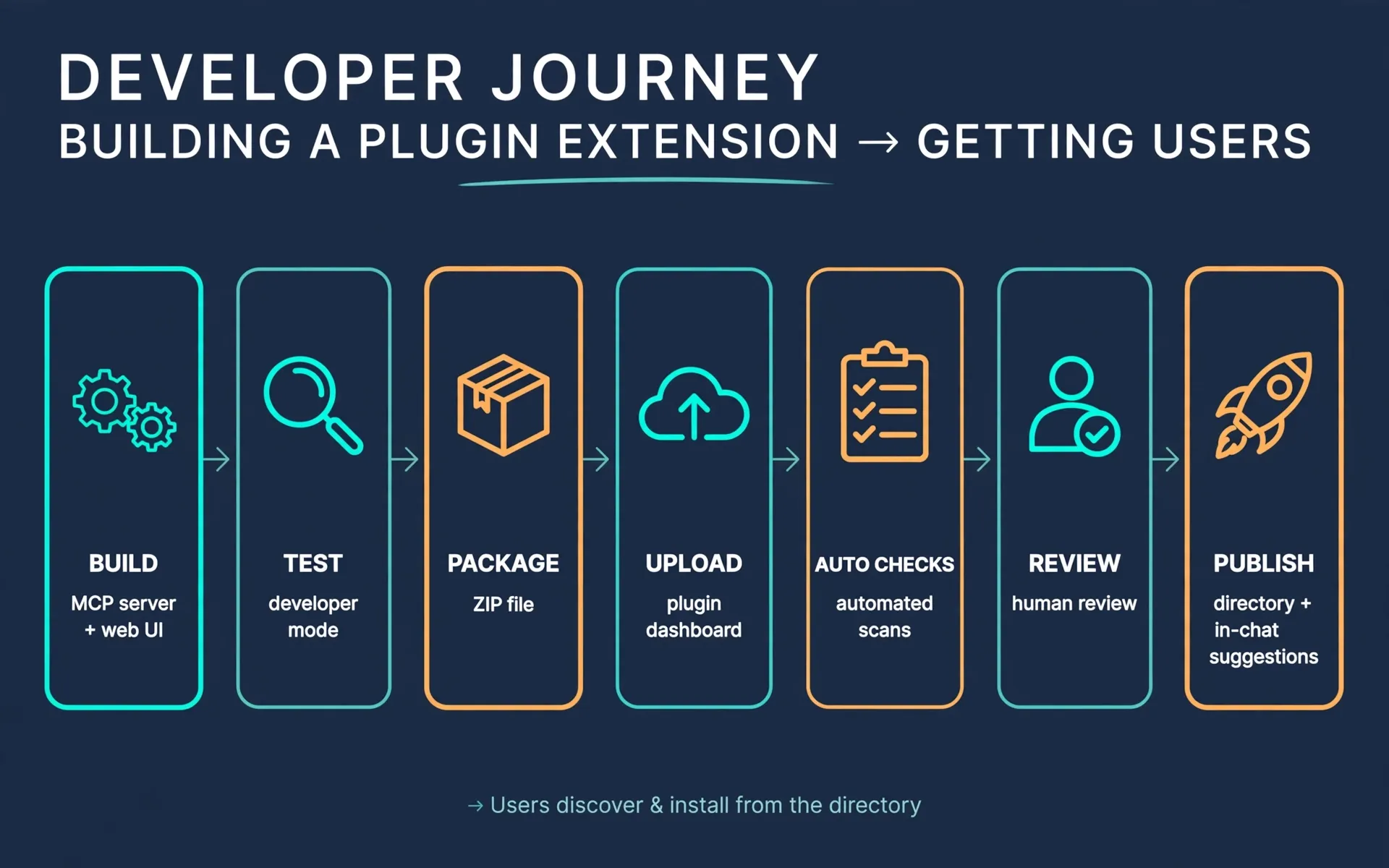
- Read the quickstart. developers.openai.com/apps-sdk/quickstart walks you through building a to-do app: MCP server + web UI in a single HTML file. It’s the fastest way to learn the shape of the thing.
- Build your MCP server. Install the official SDKs —
npm install @modelcontextprotocol/sdk @modelcontextprotocol/ext-apps zod(orpip install mcpfor Python) — and expose your tools at a/mcpendpoint. Your server is the brain; ChatGPT calls your tools through it. - Add the UI (optional but recommended). A web component rendered in an iframe. Use the MCP Apps host bridge first; only reach for the ChatGPT-specific
window.openaiextensions when the standard doesn’t cover what you need. Tools-only plugins (no UI) are allowed too. - Test in developer mode. Turn on developer mode in ChatGPT settings, add your app via its
/mcpURL (through Settings → Plugins or the developer dashboard), and drive it from a real chat. Iterate here — it’s free and instant. - Use Plugin Creator to speed up. OpenAI’s conversational builder in the plugin directory helps you describe a workflow, add instructions and reference files, and refine a reusable plugin through conversation. It’s the fastest on-ramp if you’re not sure what to build.
- Package it. Follow the plugin package guide and bundle everything into a ZIP. Keep private credentials out of the ZIP.
- Submit. Upload the ZIP at the Plugins page (platform.openai.com) under your verified identity, resolve automated findings, then submit for human review. After approval, you choose when to publish — and updates to your hosted MCP server are picked up automatically (OpenAI scans daily), so you don’t re-upload for every server-side change.
What review actually requires (from the official submission docs) — prepare this before you submit: five positive test cases, three negative test cases, a video walkthrough, reviewer credentials (a dedicated test account that works without MFA), and release notes. Trial or demo plugins are rejected outright, so ship something real.
The identity gate: all submissions must come from verified individuals or organizations — complete individual or business verification in your OpenAI organization settings before you can publish under your name.
The money math (and the trap in OpenAI’s rules)
The CAC collapse. Illustrative math: a niche mobile app paying $3/install spends $30,000 to acquire 10,000 users. A plugin extension that earns 10,000 installs through the directory and in-chat suggestions pays OpenAI nothing per install — the acquisition cost is your build time. Even if the directory only replaces a third of your paid acquisition, that’s $10k saved per 10k users at that CAC. For a solo builder, distribution was always the tax nobody could avoid. This is the first credible way to dodge it.
The trap: you cannot sell digital goods inside the plugin. Read this twice — it’s from OpenAI’s own plugin guidelines: plugins may conduct commerce only for physical goods. Selling subscriptions, digital content, tokens, or credits — even via freemium upsells — is not allowed. No checkout flows for upgrades, no pricing ads, no ads at all. Users can sign in to an existing paid account and use features already in their subscription. So the honest monetization model is a funnel: the plugin is the free, high-distribution front door; the money happens on your own domain (external checkout for physical goods, or sign-in to your existing paid product). Design for that from day one, or you’ll build a great free product with no path to revenue.
The early-mover window. The GPT Store in 2024 is the precedent: early movers captured outsized traffic while latecomers fought over scraps. Plugin extensions are at day one. The categories that aren’t coding tools are wide open — dashboards, editors, and file viewers for real workflows (design review, PDF workflows, spreadsheets, meeting recaps) have almost no competition in the directory yet. The guidelines even say plugins with strong real-world utility “may be eligible for enhanced distribution opportunities, such as directory placement or proactive suggestions” — OpenAI will promote the good ones. Being early and being good compounds.
What to do this week
- Today: read the Apps SDK quickstart (30 minutes) and the submission docs (20 minutes). Know the review requirements before you build, so you don’t architect yourself into a rejection.
- This week: pick ONE focused tool — the smallest real workflow you already understand (a file viewer, a dashboard, an editor for one file type) — and get it working in developer mode. Aim for a working demo by Sunday, not a product.
- This month: complete identity verification, package the ZIP, and submit. The review bar (test cases, video, real functionality) is the filter that keeps the directory uncrowded — which is exactly why getting through it early is valuable.
FAQ
Do I need to join a waitlist to build plugin extensions? We could not verify any waitlist. OpenAI’s docs describe a self-serve flow — build, package as ZIP, upload, pass automated checks, submit for human review — with no waitlist mentioned. Treat any “waitlist” claims from third parties as unconfirmed. (Last verified 2026-09-30.)
Is distribution really available on all ChatGPT plans? Announced as all plans. One honest caveat: RuntimeWire reports the documentation notes web extensions for Free and Go users are “coming soon,” so treat full availability as rolling out rather than complete.
Can I charge for my plugin or sell subscriptions inside it? No. OpenAI’s plugin guidelines allow commerce only for physical goods — no digital goods, subscriptions, tokens, or in-plugin checkout for upgrades. Users can sign in to an existing paid account. Build the plugin as your free distribution front door and monetize on your own domain.
How long does the review process take? Could not verify — OpenAI’s docs describe automated checks plus human review with test cases and a video walkthrough, but publish no timeline. Build the review materials (5 positive + 3 negative test cases, walkthrough video, test account) early so review isn’t your bottleneck.
How is this different from the old ChatGPT plugins? Old plugins were data connectors with no real UI. Plugin extensions are full applications with sidebar homes, interactive panels, and file viewers — plus a redesigned submission flow, better directory ranking, and in-conversation recommendations. Same MCP-based tech underneath, a completely different distribution surface.
I don’t code — is there any entry point? Yes: Plugin Creator is a conversational builder in the plugin directory that helps you describe a workflow and refine a plugin without writing code from scratch. And the no-code play is content: “how to build plugin extensions” tutorials will rank fast while day-one competition is thin.
References
- TechCrunch — OpenAI expands ChatGPT’s plug-ins with app-like interfaces and automations: https://techcrunch.com/2026/09/29/openai-expands-chatgpts-plugins-with-app-like-interfaces-and-automations/
- dev.to — I watched all 20+ OpenAI DevDay 2026 launches. Here are the 5 that change what I build: https://dev.to/aniruddhaadak5/i-watched-all-20-openai-devday-2026-launches-here-are-the-5-that-change-what-i-build-1g8p
- RuntimeWire — Everything OpenAI announced at the DevDay 2026 keynote: https://runtimewire.com/article/everything-openai-announced-at-the-devday-2026-keynote
- OpenAI Developers — MCP server and UI quickstart (Apps SDK): https://developers.openai.com/apps-sdk/quickstart
- OpenAI Developers — Upload and submit your plugin: https://developers.openai.com/apps-sdk/deploy/submission
- OpenAI Developers — Plugin guidelines: https://developers.openai.com/apps-sdk/app-submission-guidelines
Don't just read it — run the first job this week
Subscribe and get a 7-day validation checklist.
Subscribe free