How to Make Videos with Claude Opus 5.5: 4 Workflows That Actually Work
How to Make Videos with Claude Opus 5.5: 4 Workflows That Actually Work
Anthropic released Claude Opus 5.5 on September 22, 2026. Within days, creators were posting videos “made with Opus 5.5” — so many that a community project cataloged 1,511 candidate posts and reviewed 168 source-linked cases. Ads, explainers, music videos, 3D scenes, pixel-art games.
Here’s the part nobody puts in the headline: Opus 5.5 cannot output video. Its model description specifies text and image input with text output. No pixels come out of the model. So “made with Opus 5.5” always means one of four production routes — and knowing which route fits your job is the whole game.
The four routes from prompt to MP4
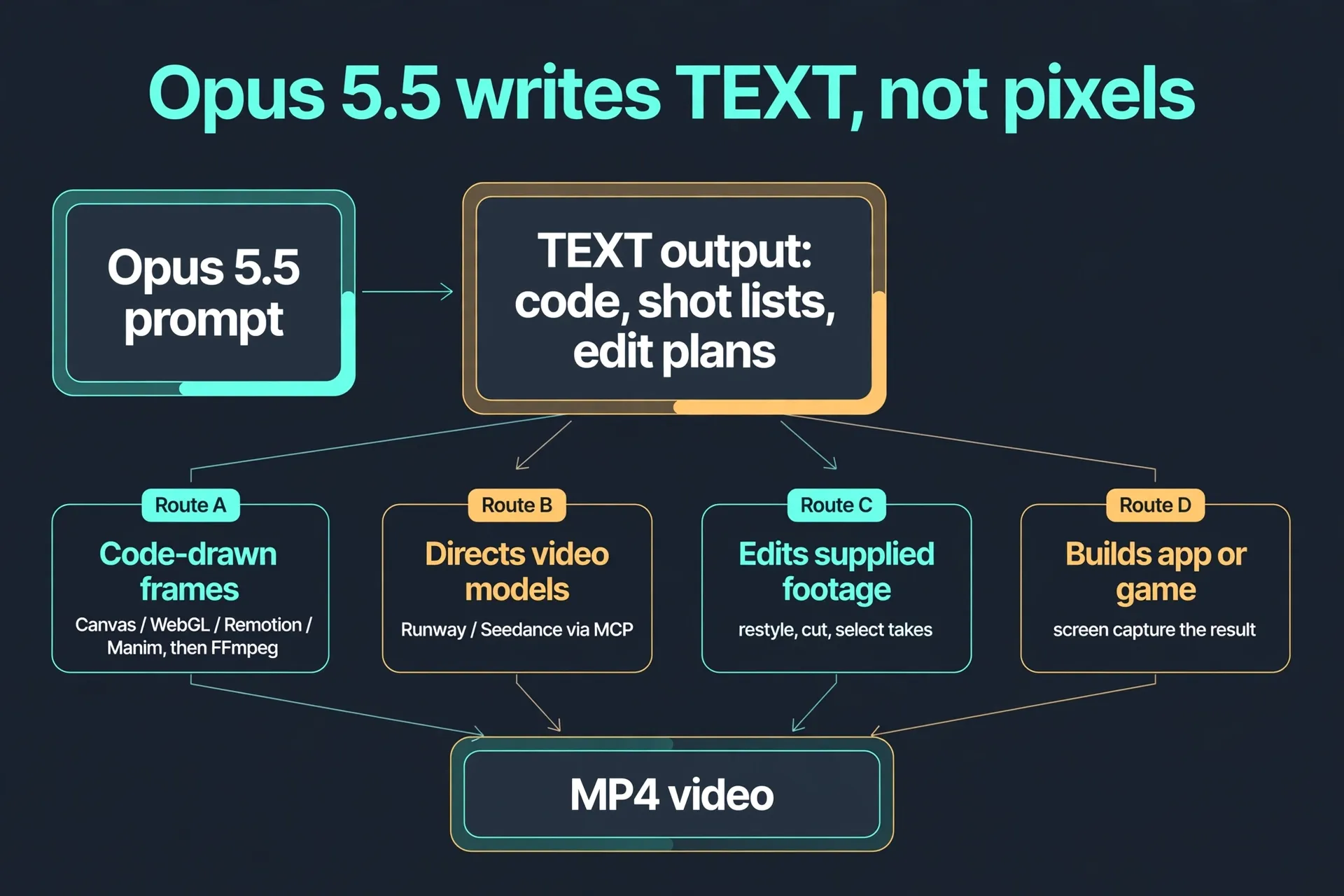
- Route A — Code-drawn frames. Opus writes JavaScript or Python that draws every frame (Canvas, WebGL, Remotion, Manim). You render the frames and assemble them with FFmpeg. This is the most common route in the corpus: motion graphics passed 3D rendering to become the #1 visual style (350 videos), driven by SaaS product ads and showreels.
- Route B — Director of video models. Opus writes shot lists and prompts, then calls an external diffusion video model (Runway, Seedance) — in one documented case through a Runway MCP hookup, with Opus acting as the agentic coordinator.
- Route C — Footage editor. You supply footage; Opus restyles it, cuts it, or picks the best takes (one creator had it select and edit thirteen talking-head takes into an 18-second cut).
- Route D — App builder + capture. Opus builds a playable browser game or interactive demo; you screen-record the result. The corpus includes a Splatoon-style game written from scratch and captured during live gameplay.
Route A in detail: the code-drawn pipeline
This is the route to learn first — it’s the most documented, the cheapest, and fully deterministic.
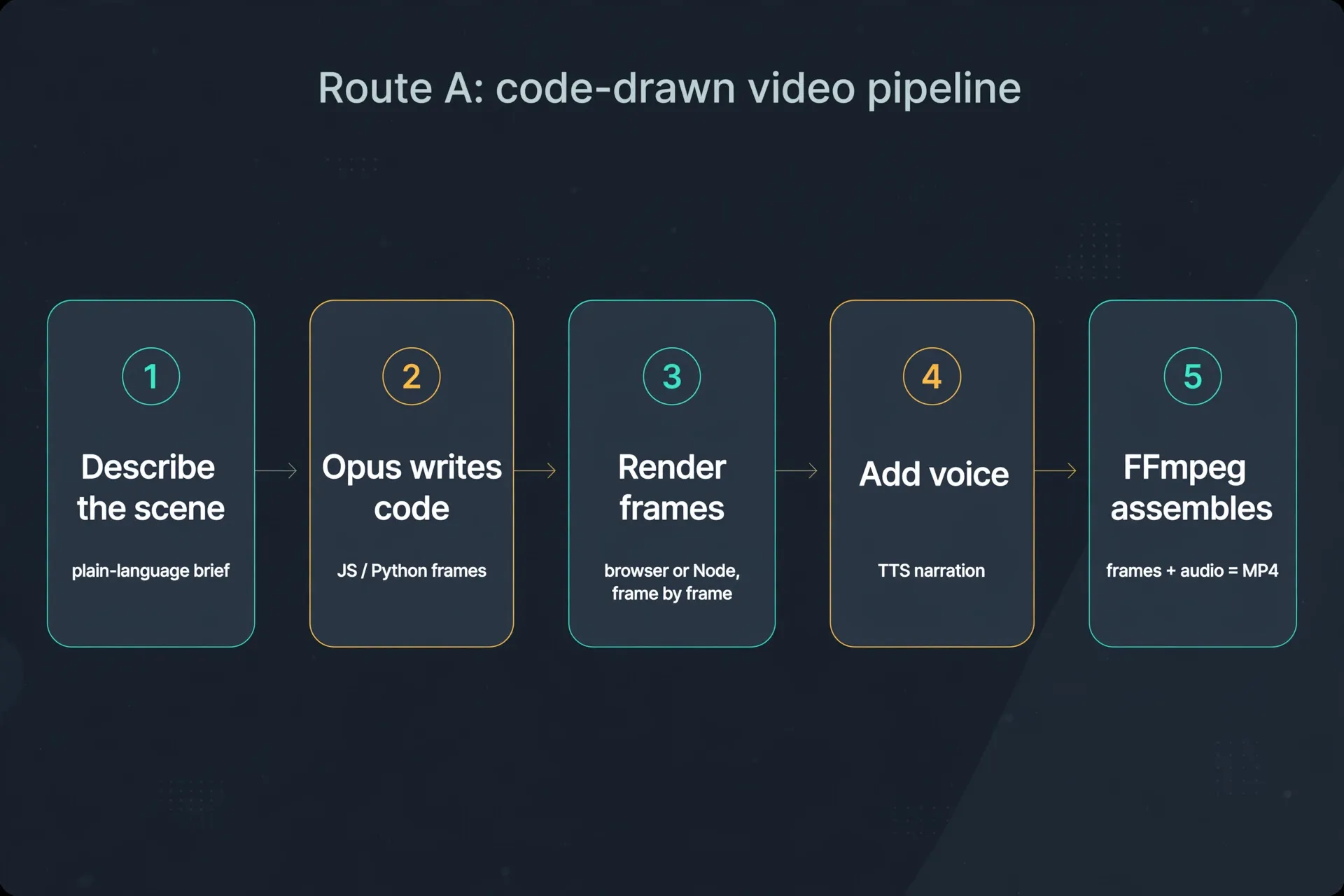
- Describe the scene in plain language. Not “make it cool” — a real brief: duration, aspect ratio, what’s on screen at each second, text overlays, color palette.
- Opus writes the frame code. Ask for deterministic rendering: fixed random seeds, explicit frame counts (e.g. 24 fps × 30 s = 720 frames), and a frame-check step so you can inspect stills before rendering the full sequence.
- Render frames in a browser or Node, frame by frame. Short scenes first — iterate on timing before committing to a long render.
- Add voice with a TTS model for narration (creators in the corpus used edge-tts, CosyVoice, and Qwen3-TTS).
- FFmpeg assembles frames + audio into the final MP4.
The “one-prompt video” is a myth. The best-documented community pipeline runs six stages with human approval checkpoints: reference video, storyboards, component libraries, director notes. Your job isn’t prompting — it’s directing.
Which route for which job
| You want | Use | Why |
|---|---|---|
| Motion graphics, ads, explainers, data viz | Route A (code-drawn) | Deterministic, cheap, text stays sharp |
| Photoreal / live-action look | Route B (direct video models) | Diffusion models own this look; Opus directs |
| Restyle or cut existing footage | Route C (footage edit) | Keeps your audio, performance, and timing |
| Interactive demo or game trailer | Route D (build + capture) | The “video” is a real working thing |
What it costs (verified Sept 27, 2026)
Opus 5.5 API pricing: $4 per million input tokens, $20 per million output tokens, with cache reads at $0.20/MTok. On the code-drawn route, the model cost per video is small — the real cost is your machine time and your directing time. The external-model route adds whatever Runway/Seedance charge on top. Prices change; treat these as a snapshot, not a quote.
The money angle: who pays for this
The corpus tells you where the demand is: Games & interactive demos (230 videos) and Ads & launches (215) were the two biggest domains. Translation: founders and sellers already pay for exactly this output.
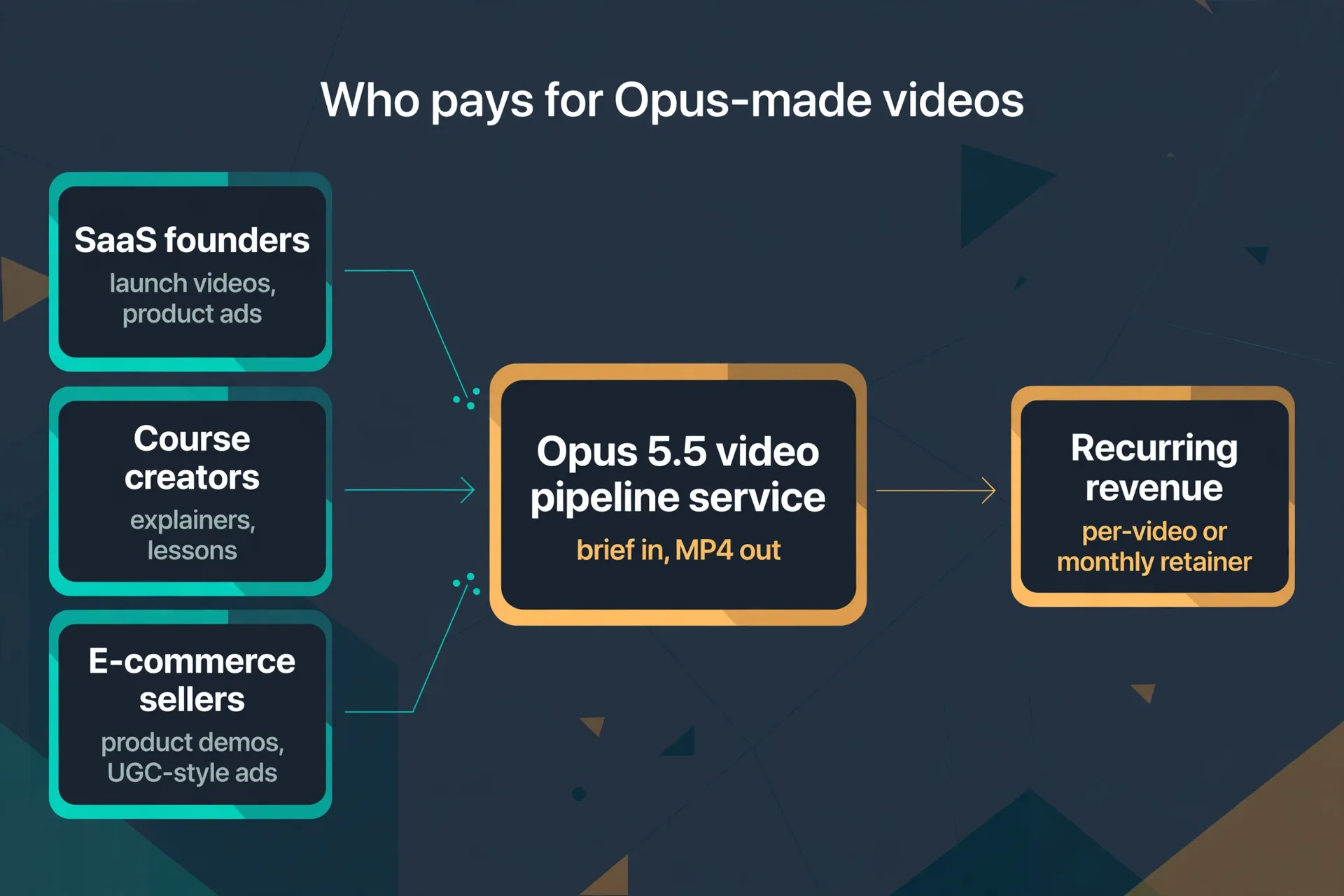
The service version is simple: brief in, MP4 out. Three buyer types with recurring need:
- SaaS founders — launch videos and product ads, every feature release.
- Course creators — explainers and lessons, every module.
- E-commerce sellers — product demos and UGC-style ads, every SKU.
Sell it per video to start; move repeat buyers to a monthly retainer once the pipeline is templated. The moat isn’t the model — it’s your template library and your turnaround time.
Don’t skip the fine print
- Authorship is murky. The repo’s own labels (“code matched”, “prompt shown”, “creator account”) describe what’s public, not proof of how a video was made. Don’t repost someone’s video as your own work.
- Verify before you trust. Subject accuracy in explainers and pronunciation in TTS need separate review — the model won’t flag its own mistakes.
- Expect iteration. The impressive cases involved human revisions, reference repos, and frame-level checks. Budget directing time, not just API credits.
The one-line summary
Opus 5.5 doesn’t render video — it writes the code, the shot lists, and the edit plans that become video. Learn Route A (code-drawn) first, pick the route that fits the job, and sell the output to the three buyer types who already pay for short video on repeat.
References
- Awesome Claude Opus 5.5 Videos — athemeroy/awesome-opus-5-5-videos — the 1,511-post corpus, 168 reviewed cases, four production routes, domain/style statistics. CC-BY-4.0.
- Claude Opus 5.5: What’s New, Pricing, and Alternatives — PowerDrill — Sept 22, 2026 release date, $4/$20 per MTok pricing, 1M context window.
- Anthropic Launches Claude Opus 5.5 — TechRepublic — launch coverage, 40%-lower-cost claim, Terminal-Bench 66.4%.
Don't just read it — run the first job this week
Subscribe and get a 7-day validation checklist.
Subscribe free