What Are OpenAI Dots? The Always-On ChatGPT Agent, Explained (Plus How to Make Money With It)
What Are OpenAI Dots?
OpenAI Dots are always-on AI agents that live inside ChatGPT: each one gets its own cloud computer and browser, plugs into 4,000+ apps, and keeps working 24/7 — including while you sleep. They launched at DevDay 2026 on September 29, and the first dot is included with Pro and Business Premium plans at no extra cost. Here’s why that matters to your wallet: every business owner who watched the keynote now wants a dot and has no idea how to set one up safely. A “Dots setup” service can charge $1,500–$3,000 per setup plus ~$500/month to manage the fleet — five retained clients is $2,500/month in recurring revenue. This is the full explainer: what Dots are, what’s confirmed vs. still beta, what they cost, how to get started, and the money play.
 Image: OpenAI
Dots, in plain language
Stop thinking “chatbot that answers questions.” A dot is a worker you leave running. You name it, tell it your goals and standards, connect the apps it needs — then hand it responsibilities, not prompts. It keeps working when you close the tab because it doesn’t live in your browser: it lives on its own cloud computer, with its own browser, learning your preferences from feedback over time.
The difference OpenAI’s own examples make clear:
- A chatbot: “Summarize this week’s customer feedback.” Task ends when the summary is done.
- A dot: “You own customer feedback from now on. If the same complaint keeps appearing, analyze why, estimate the next step, and bring the decisions back to me.”
On stage, OpenAI showed dots monitoring bug reports in Slack, testing fixes and drafting pull requests, and kicking off next year’s planning cycle. An early tester forgot to invoice a publication — his dot noticed, prepared the invoice, and sent it after his approval. That’s the product: it notices unfinished business you never asked about.
You reach your dot by messaging or voice call in ChatGPT (desktop, web, mobile), in Slack and Microsoft Teams — it carries the same context across all of them, so a thread you start at your desk continues on your phone. Texting is “coming soon.”
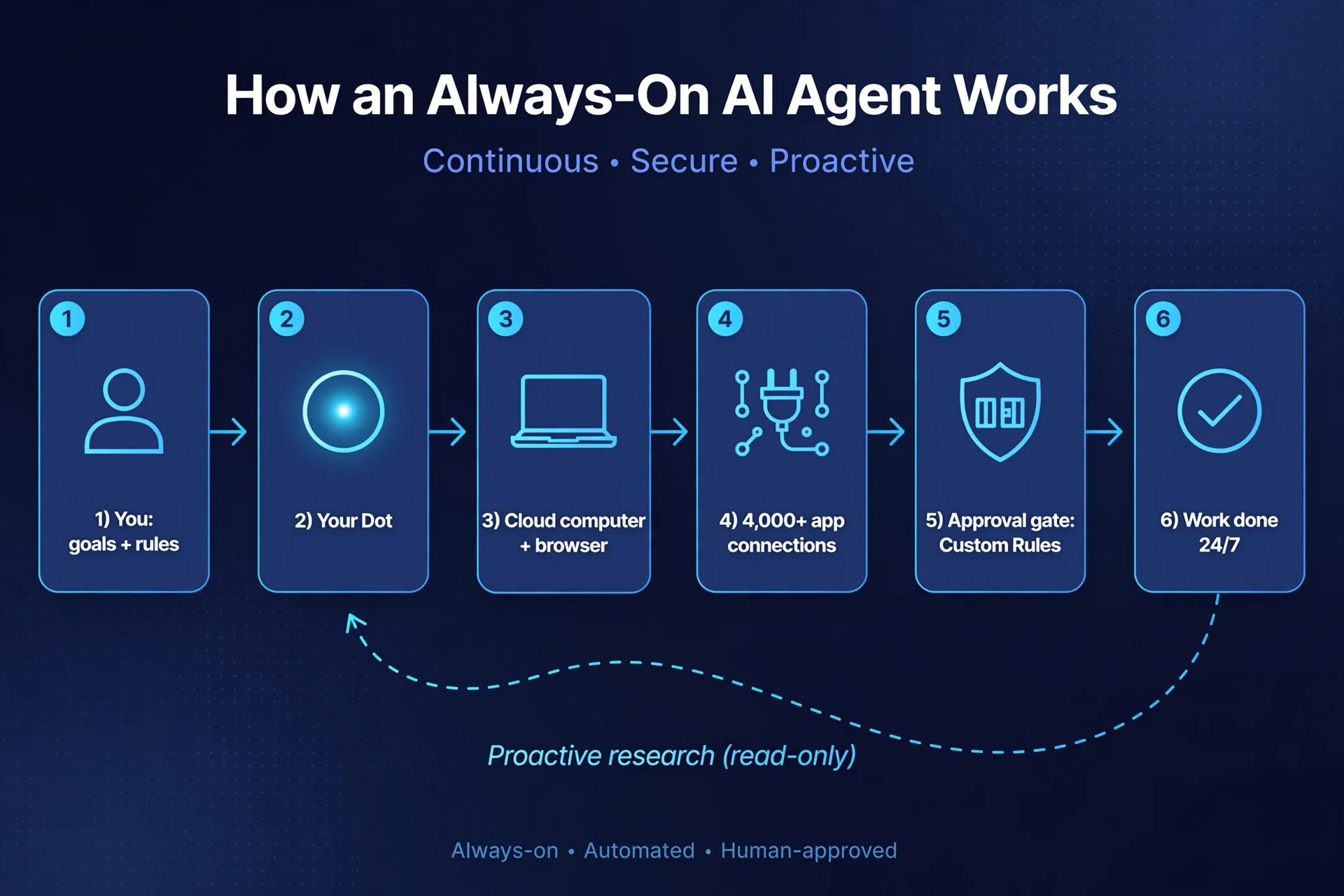
How it actually works (the five moving parts)
- Your goal and your rules. You create the dot in the ChatGPT desktop app or desktop browser, name it, and describe what good looks like. This is where most of the real value lives — a dot configured on vague instructions is a demo; one configured on crisp responsibilities is an employee.
- The cloud computer. The dot runs on its own cloud computer with its own browser. You can open its computer at any time and watch what it’s doing. With your permission it can also use your own laptop — but that access is off by default.
- 4,000+ app connections. Through ChatGPT’s plugin ecosystem, a dot can reach email, Slack, GitHub, and thousands more. Caveat: “connected” is not “all-powerful” — each app grants different read/write permissions, and some actions always need your sign-off.
- Proactive research. When you’re not actively working with it, the dot looks for ways to help in the background. This runs on read-only tools: it can look at your connected apps, but it can’t send messages, change content, or control a browser or computer on its own.
- The approval gate. Dots start with built-in rules for when to act independently and when to ask for approval. Custom Rules let you allow a specific action, require approval for it, or block it entirely. An auto-review step checks actions against your instructions before they go out. And OpenAI’s hard line: certain sensitive tasks — like changing a password — “always stay with you.”
Note what that means: the shorthand “it asks before anything sensitive” isn’t quite right. It asks according to rules you set — which is precisely why setup is a sellable service (more on that below).
What’s confirmed vs. what’s still beta or reported
Don’t build a business on rumors. Here’s the line, as of 2026-09-30:
| Claim | Status |
|---|---|
| Always-on agents powered by GPT-6 Astra, own cloud computer + browser, 24/7 | ✅ Confirmed — OpenAI’s official Dots page |
| First dot included in Pro and Business Premium at no extra cost | ✅ Confirmed — official page |
| Enterprise (incl. Edu and Healthcare) can try the beta when their workspace admin enables it | ✅ Confirmed — official page |
| Chatting with your dot doesn’t count toward ChatGPT usage limits; tasks it starts in Codex or ChatGPT Work do | ✅ Confirmed — official page |
| Approval rules, Custom Rules, read-only proactive research, password changes stay with you | ✅ Confirmed — official page |
| You can add more dots later and scale each dot’s speed/monthly workload | ✅ Confirmed direction — official page (“in the future”); prices 待验证 |
| Specialist dots (per-role enterprise agents) + Microsoft Agent 365 integration | ✅ Confirmed — enterprise pilots, official page |
| First-month launch window: deeper-work usage not metered / extended limits | ⚠️ Reported — help-center wording via coverage; formal usage terms per plan come after |
| Plan prices (Pro “from $100,” new $500 Pro 500 tier, Business Premium ~$125/user) | ⚠️ Reported, not confirmed — plan ladder was reshuffled; verify on OpenAI’s pricing page |
| Pro users in the EEA, Switzerland, and the UK excluded at launch; 18+ only | ⚠️ Reported — two outlets; awaiting official confirmation |
| Texting your dot | ⚠️ Limited — official page says “coming soon”; coverage reports a US-only Pro beta |
The honest summary: the product is real and the bundling is confirmed, but the long-term usage pricing is the big unknown. OpenAI explicitly says usage terms per plan arrive after the launch month. Treat every dollar figure for ongoing dot usage as 待验证.
Pricing and packaging facts
What you can state with confidence:
- First dot: $0 extra on Pro and Business Premium — confirmed by OpenAI.
- Chatting with your dot: doesn’t touch your ChatGPT usage limits — confirmed.
- Deeper work (real agent tasks) draws on a plan allowance, with extended limits for the first month after launch — the launch window to experiment heavily.
- More dots and more speed: sold separately, later. This is the second product OpenAI is clearly building — and the reason a “manage the fleet” retainer model makes sense for you.
What to mark 待验证: the exact plan prices after the DevDay reshuffle (reported: a $100 Pro tier, a reopened Pro 200, a new $500 Pro 500 with 25× Plus allowance), and every number about per-plan dot usage terms after month one.
How a beginner gets started (concrete steps)
- Get a qualifying plan. Pro (reported from ~$100/month) or Business Premium. Enterprise works only if your workspace admin enables the beta. Plus and Free don’t get dots yet.
- Create the dot on desktop. In the ChatGPT desktop app or desktop browser — creation isn’t supported on mobile web; after setup you can message your dot from the mobile app.
- Name it and set the standard. Don’t write prompts; write a job description: what it owns, what good looks like, who it’s accountable to.
- Connect apps — minimally. Start with the 2–3 apps that matter for the first responsibility (e.g., email + Slack + calendar). Every connection is a permission surface; add more later.
- Write Custom Rules before it does anything real. Allow, require-approval, block — per action. Decide the sensitive list in writing (money movement, external messages, publishing).
- Watch the Activity View. Follow its background work for the first week and correct it early — it learns from feedback.
The money play #1: sell “Dots setup” as a service to businesses
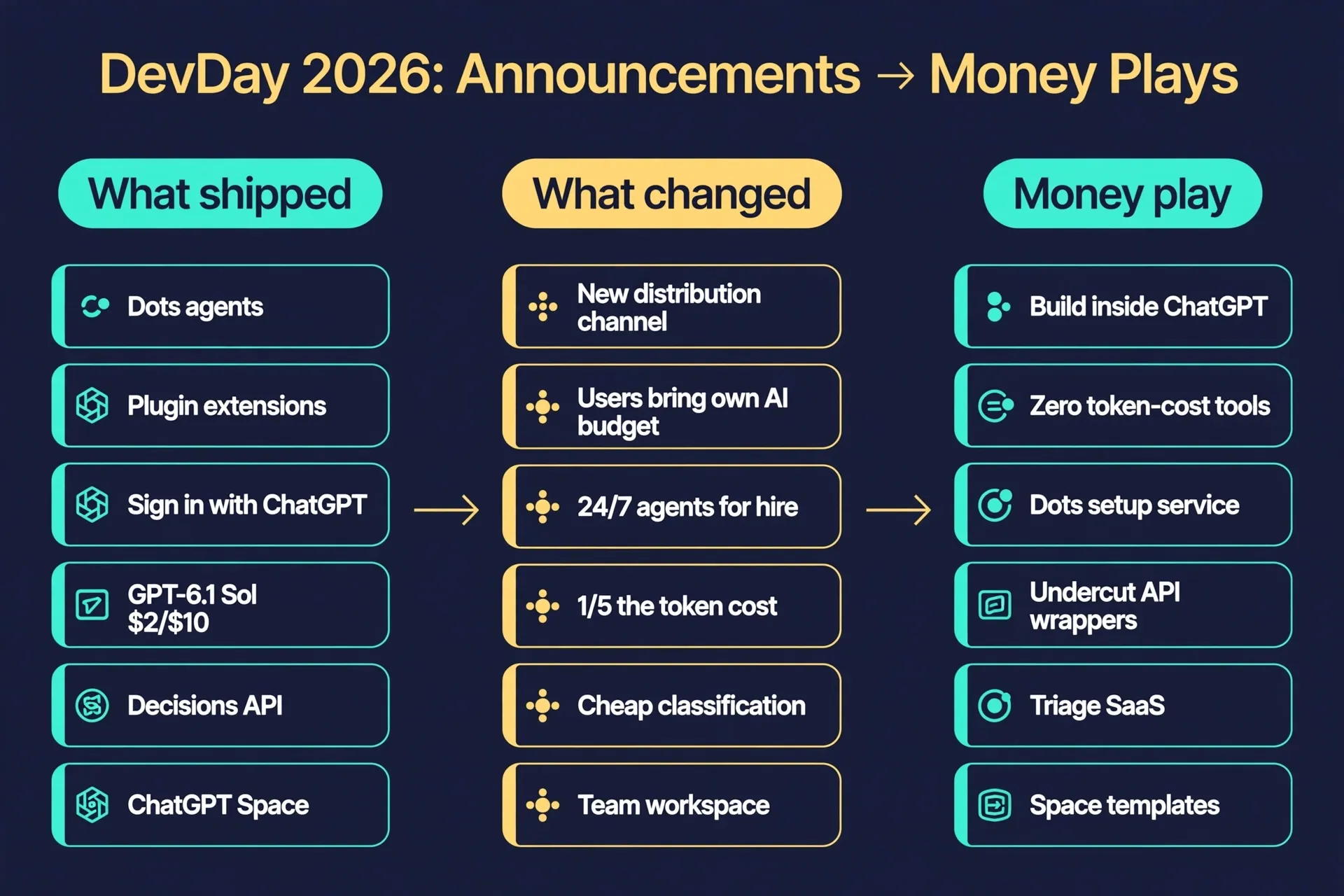
This is the window. Dots are powerful and confusing. Every business owner who watched the keynote wants one and has no idea how to configure it safely — and now you know exactly why setup matters: Custom Rules, app permissions, and approval gates are the product’s safety spine, and someone has to define them per business.
The package:
- Audit: find 3–5 recurring workflows the business bleeds time on (invoicing, weekly reports, lead follow-up, inbox triage).
- Configure: set up the dot + Team Tasks (scheduled/event-driven automations) + MCP events (triggering work when something happens in a connected app).
- Hand over docs: the responsibility list, the Custom Rules, the approval policy, the “how to talk to your dot” one-pager.
- Charge: $1,500–$3,000 one-time setup + $400–$600/month retainer to manage the fleet (adding dots later, tuning rules, onboarding staff).
The math, with a real scene. Maya runs a 15-person real estate agency. Her ops manager spends ~3 hours a week compiling listing updates and follow-up reports — at ~$45/hour loaded cost, that’s about $540/month of human time. A dot drafts the reports on autopilot inside the plan she already pays for; the setup pays for itself in under 4 months. As the provider: five clients at $500/month is $2,500/month recurring, roughly 10 hours a week once your first two builds become reusable templates.
Why the window is now: OpenAI is about to sell more dots and more speed per dot — every month the installed base grows, the demand for people who set them up safely grows with it. The first 3–6 months have almost no competition.
The money play #2: sell Dots/Space templates
The productized version of play #1: don’t sell hours, sell packs. A “Realtor listing follow-up” dot pack — pre-written responsibilities, Custom Rules, connected-app checklist, onboarding doc — at $79–$299, sold the way Notion templates sell. Pair each with a ChatGPT Space setup (shared pages, Team Tasks, @ChatGPT in Slack) and you’ve got a $199–$499 “workspace in a box” for small teams. Template sellers who built audiences on Notion and Airtable: this is your next pack, and the search window is open right now — millions are asking “what are openai dots” this week.
What to do this week
- Today: read OpenAI’s official Dots page. If you’re on Pro or Business Premium, create your first dot and document every step — that doc becomes your setup-service product.
- This week: audit one real business (yours or a friend’s). List 5 recurring workflows a dot could own. Draft a one-page offer: “Dots setup for [your niche].”
- This month: ship the offer page, close 1–2 pilot clients at a founding discount in exchange for testimonials, and package the build into a reusable template.
If this playbook was useful, bookmark it and subscribe to our newsletter — we’ll track whether Dots setup services actually pay out and report back with real numbers.
FAQ
What are OpenAI Dots? Always-on AI agents inside ChatGPT, powered by GPT-6 Astra. Each dot gets its own cloud computer and browser, connects to 4,000+ apps, learns your work patterns from feedback, and keeps working 24/7. You give it responsibilities, not prompts.
How much do Dots cost? The first dot is included in Pro and Business Premium at no extra cost (confirmed). Chatting with it doesn’t count toward your ChatGPT usage limits. Deeper agent work draws on a plan allowance with extended limits during the first month; formal usage terms arrive later — treat them as 待验证. Extra dots and speed upgrades will be sold separately in the future.
Who can use Dots right now? Pro and Business Premium users in eligible markets (confirmed). Enterprise, Edu, and Healthcare users can try the beta when their workspace admin enables it (confirmed). Reported but unconfirmed: Plus/Free excluded, 18+ only, and Pro users in the EEA, Switzerland, and the UK excluded at launch.
Do Dots ask before doing anything sensitive? Not exactly — it’s rule-based, not “ask everything.” Dots start with built-in rules for when to act alone and when to ask for approval; Custom Rules let you allow, require-approval, or block specific actions; auto-review checks actions before they go out. Proactive background research is read-only (it can’t send, change, or click). Certain sensitive tasks, like changing a password, always stay with you. (Confirmed on OpenAI’s Dots page.)
Dots vs. ChatGPT Work — what’s the difference? ChatGPT Work’s unit is one task or thread: finish it and it’s done. A dot is a persistent agent that holds ongoing responsibilities — checking, updating, and improving the work over weeks, and surfacing only the decisions that need you.
Is the $500 Pro tier confirmed? The Pro 500 name appeared on the DevDay keynote slide and $500/month is widely reported, but we haven’t seen it on OpenAI’s pricing page yet — treat the price as reported, not confirmed. (Last verified 2026-09-30.)
I don’t code — is there anything here for me? Yes: the Dots setup service and the template packs need no code at all. If you sold “ChatGPT for business” training in 2024–2025, this is your 2026 upgrade — the explainer window is open this week.
References
- OpenAI — Introducing dots (official): https://openai.com/index/introducing-dots/
- Andrew Lauchner — OpenAI DevDay 2026: every launch, what it costs, who gets it: https://andrewlauchner.com/notes/openai-devday-2026
- DEV Community — every announcement, with prices and availability: https://dev.to/axrisi/openai-devday-2026-every-announcement-with-prices-and-availability-1mbh
Don't just read it — run the first job this week
Subscribe and get a 7-day validation checklist.
Subscribe free